

A Google Business Profile for travel agents can help an eligible business be discovered in Google Search and Maps. It is not a shortcut to guaranteed rankings, and not every home-based travel advisor qualifies. Start with eligibility, then make the profile accurate enough that a nearby person can understand who you help and how to contact you.
The header is an AI-generated editorial illustration, not a real CATT client meeting, office or Google listing.
This is a focused local-discovery guide, not a full SEO plan. The SEO guide for travel agencies covers website content and search visibility more broadly. Here, we are dealing with one specific question: does a Google Business Profile belong in your visibility mix, and if so, how do you keep it useful and policy-compliant?
Google Business Profile eligibility for travel agents
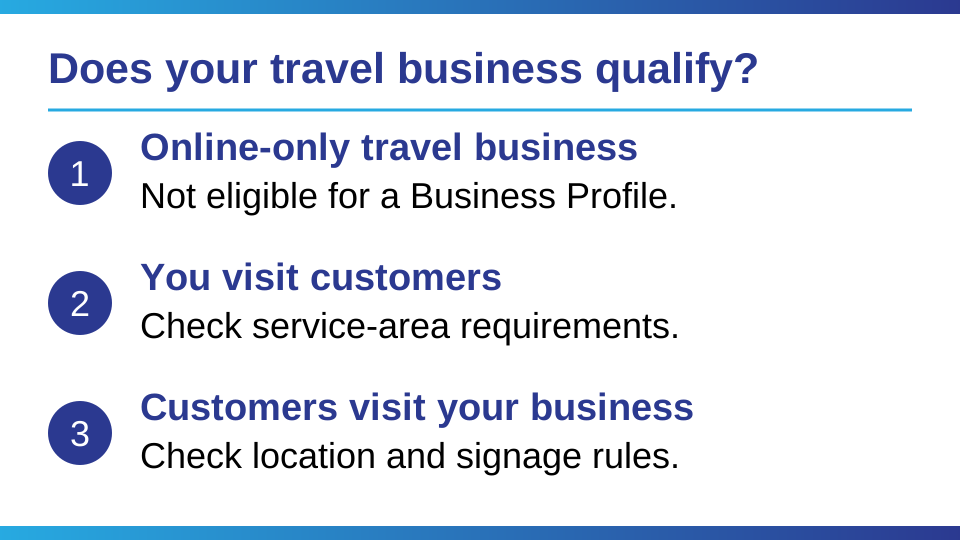
Google says a business must make in-person contact with customers during its stated hours to qualify for a Business Profile. Online-only businesses are not eligible. That means working from home by itself does not make an advisor eligible or ineligible; the relevant question is whether your real business has an eligible, genuine in-person customer interaction.
Read Google's current Business Profile eligibility guidance before you create a profile. If your business operates entirely online and you never meet customers in person, don't add a profile just because local competitors have one. An inaccurate listing can create more problems than it solves.
What if you work from home?
The address question depends on how customers meet you. A storefront business that receives customers at its location should use its real, eligible business location and follow Google's signage and representation rules. A service-area business that visits customers at their locations should use a service area and hide an address where it does not serve customers. A hybrid business may show its staffed customer-facing location and also define a service area.
Google's address guidance says the address is public and should only be hidden when the business is a service-area business. Its service-area guidance says to remove the address if customers are not served there. Do not use a virtual office, mailbox, borrowed storefront or keyword-stuffed address to imply a local presence you do not have.
If your client conversations happen by phone, email or video only, check the eligibility rules carefully rather than assuming that a broad service area makes the profile eligible. A service area is for a business that visits customers or delivers to them, not a way to label every place an online business can serve.
How to set up a Google Business Profile for your travel agency
If you are eligible, claim and verify the profile you control. Use the business name customers recognize in the real world, choose the closest accurate primary category, and keep your phone number, website, hours and address or service area current. Google says complete, accurate information can help its systems understand and match a profile to relevant local searches, but it does not promise a position.
Work through the setup in this order:
- Check whether a profile for your business already exists before creating another one. Google generally permits one profile per business.
- Use your real business name. Put accurate categories, your address or service area, and contact details in their proper fields, not in a keyword-stuffed name.
- Choose the fewest accurate categories that describe the business. Describe your travel specialty in useful service copy rather than treating every destination as a category.
- Complete Google's verification process and keep the profile under an account you control.
- Open your website link, check your phone number and review the customer-facing information for accuracy.
These steps follow Google's business representation guidelines. Verification is not a promise of rankings, and a new profile should not be used to work around an existing restriction or suspension.
Keep the description plain and useful. Say what kinds of trips you plan, who you work with and how someone should take the next step. Use ordinary language rather than repeating city names or search phrases. A simple hypothetical example might be: "I help families plan multigenerational trips, from comparing resort options to organizing the details before departure." That is an editorial illustration, not a CATT client example or a claim about typical results.
Add current, genuine photos that help someone recognize the business or understand the service. Never present a stock or AI image as a real client, office or booking. If you do not have a customer-facing storefront, do not imply that you do.
Ask for genuine Google reviews from travel clients
Reviews can help a prospective client understand what working with you felt like. After a completed trip or another genuine service interaction, you can send a neutral request to all appropriate customers and make it easy to respond. Google's review request guidance permits sharing a review link or QR code, but its review policies prohibit incentives and biased solicitation. Do not offer a discount, gift or other benefit for a review, ask only happy clients, or pressure someone to change a negative review.
Reply calmly and protect client privacy. A short thank-you is enough for a positive review. For a concern, acknowledge it without exposing private trip details or arguing in public. The goal is a truthful record, not a perfect-looking star rating.
A monthly Google Business Profile maintenance routine
Put a recurring 15-minute reminder on your calendar. Review the profile itself, not just whether you appear for one search from one location.
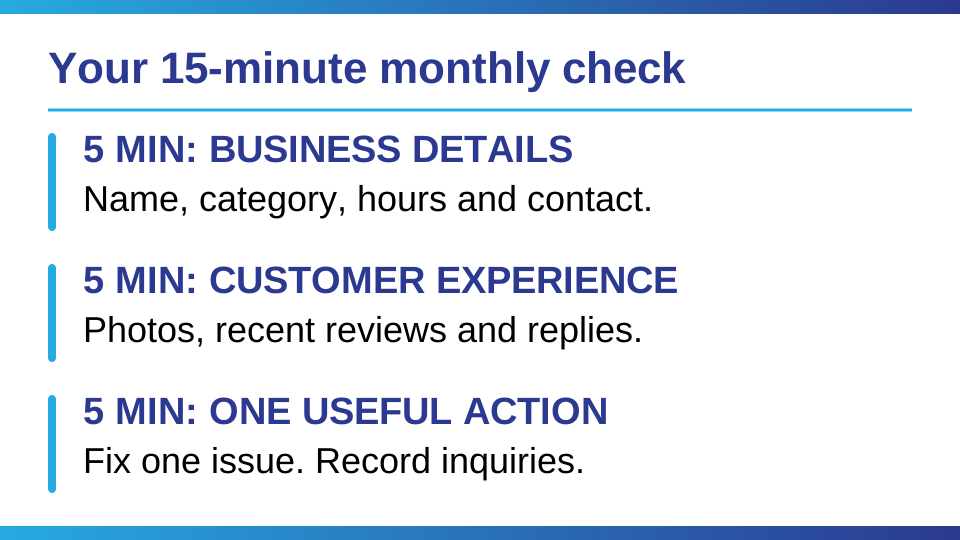
- Confirm your name, category, phone, website and hours still match how the business operates.
- Check that the address or service area reflects where and how you genuinely meet customers.
- Read new reviews, respond where useful and note recurring questions you can answer on your website.
- Replace outdated photos or seasonal information rather than posting just to look active.
- Check profile performance over time and compare it with qualified inquiries, not only views or calls.
Google describes local results as primarily based on relevance, distance and prominence in its local ranking guidance. Distance is not something you can edit with keywords, and Google says there is no way to request or pay for better local ranking. Complete information and genuine reputation signals can support discovery, but there is no setting that guarantees visibility.
If you are not eligible for a profile, the next move is still useful: make your website clear about your specialty and the places you actually serve, keep contact details consistent where your business is listed, and build relationships that lead to real referrals. The Visibility Audit helps you check the channels you can use. For a wider weekly system, read the travel advisor marketing playbook.
Common questions
Can a home-based travel agent have a Google Business Profile?
Possibly, but working from home alone does not establish eligibility. Google says a business must make in-person contact with customers during its stated hours. If you serve customers at your home, follow the rules for a customer-facing location; if you visit customers, a service-area profile may apply and your home address should be hidden when you do not serve customers there. Online-only businesses are not eligible.
Should a travel advisor show a home address on Google?
Only show an address if it is an eligible location where your business serves customers and meets Google's representation rules. If you are an eligible service-area business that does not serve customers at that address, hide it and set an accurate service area. Do not use a virtual or borrowed address to imply a location you do not operate.
How should a travel agent choose a Google Business Profile category?
Choose the closest accurate primary category available for what your business actually does. Use the fewest categories needed to describe the business, rather than adding unrelated categories for search visibility. Keep your real business name free of extra keywords, city names and marketing claims; use the appropriate service and description fields to explain your specialty.
How do travel agents get Google reviews?
After a genuine service experience, you can send customers a neutral request with Google's review link. Do not offer rewards, ask only satisfied customers, or pressure anyone to change a review. Respond professionally and protect client details in public replies.
Does a Google Business Profile guarantee local rankings?
No. Google describes local results as mainly based on relevance, distance and prominence, and says there is no way to request or pay for a better local ranking. Accurate information and genuine reviews can support discovery, but no profile setting guarantees a position or a number of inquiries.
Choose one next step
If you are eligible, check the address and category first. If you are unsure, read Google's current eligibility guidance before making changes. If your local presence is already accurate, spend the next fifteen minutes improving one customer-facing detail rather than chasing a ranking trick.


Oliver Catt ran Learning and Development for Unique Vacations, the worldwide representative for Sandals and Beaches Resorts. Alexandra Catt built her own travel business to six figures in its first year. Together they run Coaching Agents Through Travel, a business training community for independent travel advisors across the US and Canada. They are not a host agency and they do not recruit advisors.